Saturday, February 28, 2015

how to get and display post data codeigniter

first Setup codeigniter project Click Here

here you find how to get post data in controller and sent back to view.
Create Controller postdata.php in controller folder put the below code inside the file.

<?php if ( ! defined('BASEPATH')) exit('No direct script access allowed');
class Postdata extends CI_Controller {

//constructor
function __construct()
{
parent::__construct();
$this->load->helper('url');
}
//index() method
public function index()
{
$this->load->view('postData');
}
//view() method
}
 ?>


Create view postData.php in view folder put the below code inside the file.
here we creating a form for getting basic info about user. form action(url where you get post data) and method(post) need to specify.


<html>
<head><title>Post Data Example</title></head>
<style type="text/css">
.title { font-family: Arial, Helvetica, sans-serif; text-align:center;width:350px; }
.tableDesign { font-size:16px;font-family:Arial, Helvetica, sans-serif; width:350px; height: 270px; }
table { background-color:#CCC; }
table input { height:25px;font-size:16px; }
table tr { height:2px; }
.errorMessage { color:red;text-align:center; }</style>
<body>
   <form id="form1" name="form1" method="post" action="<?php echo base_url(); ?>index.php/postdata/view">
      <label><div class="title"><u>Post Data Example</u></div></label>
      <table style="" class="tableDesign">
         <tr><td colspan="2"><?php if(isset($_GET['err_message'])){ echo "<div class='errorMessage'>".$_GET['err_message'].'</div>'; } ?></td></tr>
         <tr><td>First Name: </td><td><input type="text" name="txtFirstName" /></td></tr>
         <tr><td>Last Name: </td><td><input type="text" name="txtLastName" /></td></tr>
         <tr><td>Gender:</td><td><input type="radio" name="txtGender" value="Male" checked />
            Male&nbsp;<input type="radio" name="txtGender" value="Female" />Female</td></tr>
         <tr><td>Mobile No.: </td><td><input type="text" name="txtMobileNo" /></td></tr>
         <tr><td>E-mail: </td><td><input type="text" name="txtEmail" /></td></tr>
         <tr><td>&nbsp;</td><td><input type="submit" name="submit" value="Submit" /></td></tr>
    </table>
</form>
</body>
</html>


Now, Open your browser go through below url

http://localhost/codeigniter/index.php/postdata

here you can see html form input fields to collect basic info.

Put below code inside  Controller postdata.php after index method(after //view() method )
Method get the post data and sent back to view for display data.

         public function view()
{
/* $data['firstName'] = $this->input->post('txtFirstName');
$data['lastName'] = $this->input->post('txtLastName');
$data['gender'] = $this->input->post('txtGender');
$data['mobileNo'] = $this->input->post('txtMobileNo');
$data['email'] = $this->input->post('txtEmail'); */

$data['postData'] = $this->input->post();
$this->load->view('postDataDisplay', $data);
}


Create view postDataDisplay.php in view folder put the below code inside the file for displaying post data result on the browser.

<html>
<head>
<title>Post Data Example</title>
</head>
<style type="text/css">
.title { font-family: Arial, Helvetica, sans-serif; text-align:center;width:350px; }
.tableDesign { font-size:16px;font-family:Arial, Helvetica, sans-serif; width:350px; height: 210px; }
table { background-color:#CCC; }
table input { height:25px;font-size:16px; }
table tr { height:2px; }
.errorMessage { color:red;text-align:center; }</style>
<body>
  <label><div class="title"><u>Post Data Display</u></div></label>
  <table style="" class="tableDesign">

  <!--<tr><td>First Name: <?php echo $firstName; ?> </td></tr>-->

    <tr><td>First Name: <strong><?php echo $postData['txtFirstName']; ?></strong></td></tr>
    <tr><td>Last Name:  <strong><?php echo $postData['txtLastName']; ?></strong></td></tr>
    <tr><td>Gender: <strong><?php echo $postData['txtGender']; ?></strong></td></tr>
    <tr><td>Mobile No.:  <strong><?php echo $postData['txtMobileNo']; ?></strong></td></tr>
    <tr><td>E-mail:  <strong><?php echo $postData['txtEmail']; ?></strong></td></tr>
  </table>
</form>
</body>
</html>


Thanks for the visiting this blog.

hello world codeigniter example

hello friends, here you can find source code for,  how to create simple hello world application in codeigniter

first download source for codeigniter from here  Download Codeigniter  extract zip file in www folder rename default name with your project name.

change your configuration in config file application/config.php  config.php file

$config['base_url'] = '';
             to
$config['base_url'] = 'http://localhost/codeigniter/'; //change your project configuration here.

create controller first.php in controller folder. Copy and Past below code in that file
controller/first.php
<?php if ( ! defined('BASEPATH')) exit('No direct script access allowed');
class First extends CI_Controller {
function __construct()
{
parent::__construct();
}
public function index()
{
$this->load->view('first'); //load view file first.php no need for extention  .php it added by default
}
}
?>

Create view first.php in view folder. Copy and Past below code in  that file.
view/first.php
<html>
<head><title>First Example</title></head>
<style type="text/css">
.design{ background: #CCCCCC;width: 20%;text-align: center;margin-left: 40%; }
</style>
<body>
<div class="design"><h1>Hello World.!<Br>Welcome Done...!!!</h1></div>
</body>
</html>

Now open your browser and go through below link.

http://localhost/codeigniter/index.php/first

- codeigniter is your project name .

- need to add index.php in url. It is also possible to remove index.php from url creating .htaccess file in project root folder using url routing.

- first is your controller name.

- Now you done you can see the output on browser. Thank you for visiting my blog.

user registration and authentication example

here is a code for authentication system( user registratoin  and login functionality).

First of  all set your database configuration in Db.php file,  and then create table in database and  Add all content in specified file name.

First you need to do the registration  then after you can login in to the system. After login you redirect on the page Welcome.php  here you can find Logout link for logout from the system.

In this I havn’t create index file so you need to go through direct link.

Create Table

CREATE TABLE IF NOT EXISTS `login` (
  `id` int(11) NOT NULL AUTO_INCREMENT,
  `firstname` varchar(20) NOT NULL,
  `lastname` varchar(20) NOT NULL,
  `gender` varchar(5) NOT NULL,
  `mobileno` varchar(20) NOT NULL,
  `email` varchar(50) NOT NULL,
  `password` varchar(50) NOT NULL,
  PRIMARY KEY (`id`)
) ENGINE=InnoDB DEFAULT CHARSET=latin1 AUTO_INCREMENT=1 ;

Create files specified file name Db.php, Registraton.php, Login.php, Welcome.php.
Copy and Past the code in the files and then run the example.

DB.php

<?php
    $conn = mysql_connect("localhost","root","");
    mysql_select_db("practice",$conn);                                       
?>

Registration.php

<?php include('Db.php'); ?>
<html><head><title>Registration</title></head>
<style type="text/css">
.title { font-family: Arial, Helvetica, sans-serif; text-align:center;width:350px; }
.tableDesign { font-size:16px;font-family:Arial, Helvetica, sans-serif; width:350px; height:400px; }
table { background-color:#CCC; }
table input { height:25px;font-size:16px; }
table tr { height:15px; }
.errorMessage { color:red;text-align:center; }
</style>
<body>
<form id="form1" name="form1" method="post" action=""> 
  <label><div class="title"><u>Registration Form</u></div></label>
  <table style="" class="tableDesign">
    <tr><td colspan="2"><?php if(isset($_GET['err_message'])){ echo "<div class='errorMessage'>".$_GET['err_message'].'</div>'; } ?></td></tr>
    <tr><td>First Name: </td><td><input type="text" name="txtFirstName" /></td></tr>
    <tr><td>Last Name: </td><td><input type="text" name="txtLastName" /></td></tr>
    <tr><td>Gender:</td><td><input type="radio" name="txtGender" value="Male" />
            Male&nbsp;<input type="radio" name="txtGender" value="Female" />Female</td></tr>
    <tr><td>Mobile No.: </td><td><input type="text" name="txtMobileNo" /></td></tr>
    <tr><td>E-mail: </td><td><input type="text" name="txtEmail" /></td></tr>
    <tr><td>Password: </td><td><input type="password" name="txtPassword" /></td></tr>   
    <tr><td>&nbsp;</td><td><input type="submit" name="submit" value="Submit" /></td></tr>
       <tr><td>&nbsp;</td><td><a href="Login.php">Back To Login</a></td></tr>
  </table>
</form>
<?php if(isset($_POST['submit']))
{             
                $resultExists = mysql_query("select count(*) userExists from login where email = '".$_POST['txtEmail']."'")or die(mysql_error());           
                $rowExists = mysql_fetch_array($resultExists);
                if($rowExists["userExists"] > 0){ header("Location:Registration.php?err_message=Email Already Exists.!!!"); }
                else {
                                $result = mysql_query("insert into login(firstname, lastname, gender, mobileno,email, password) values('".$_POST['txtFirstName']."','".$_POST['txtLastName']."','".$_POST['txtGender']."','".$_POST['txtMobileNo']."','".$_POST['txtEmail']."','".md5($_POST['txtPassword'])."')")or die(mysql_error());
                                $row_count = mysql_affected_rows();
                                if($row_count == 1){ header("Location:Login.php?message=Registration Successfull.!!!"); }
                                else { echo "Not Insert...!!!"; }
                }
}?>
</body>
</html>

Login.php

<?php include('Db.php'); session_start();  ?>
<html><head><title>Login</title></head>
<script type="text/javascript">
function validation() {
    var f =document.loginForm;
    var error = "Please Check Errors";
    var flag = true;   
    if(f.txtUserName.value == "") {                 
        error += "\nEnter User Name";       
        flag = false;
    }
    if(f.txtPassword.value == "") {                 
        error += "\nEnter Password";       
        flag = false;
    }
    if(flag == false)
    { alert(error); }
    return flag;
}
</script>                                            
<style type="text/css">
.title { font-family: Arial, Helvetica, sans-serif; text-align:center;width:350px; }
.tableDesign { font-size:16px;font-family:Arial, Helvetica, sans-serif; width:350px; height:150px; }
table { background-color:#CCC; }
table input { height:25px;font-size:16px; }
table tr { height:15px; }
.errorMessage { color:red;text-align:center; }
.message { color:green; }
</style>
<body>
<?php if(isset($_GET['action'])&& isset($_SESSION['userAuthenticated'])){ unset($_SESSION['userAuthenticated']); } ?>
<form name="loginForm" method="post" onsubmit="return validation()">
<label><div class="title"><u>Login</u> &nbsp;</div></label>
<table class="tableDesign">
    <tr><td colspan="2"><?php if(isset($_GET['err_message'])){ echo "<div class='errorMessage'>".$_GET['err_message'].'</div>'; }
                                                                                                                  else if(isset($_GET['message'])){ echo "<div class='message'>".$_GET['message'].'</div>'; }  ?></td></tr>
    <tr><td>UserName</td><td><input type="text" name="txtUserName"></td></tr>
    <tr><td>Password</td><td><input type="password" name="txtPassword"></td></tr>
    <tr><td>&nbsp;</td><td><input type="submit" name="submit" value="submit"></td></tr>
   <tr><td>&nbsp;</td><td><a href="Registration.php">Registration</a></td></tr>
</table>
</form><?php
if(isset($_POST['submit']))
                $username = $_POST['txtUserName'];   
                $password = $_POST['txtPassword'];               
                $result = mysql_query("select count(*) as authenticated from login where email = '{$username}' and password = '".md5($password)."'")or die(mysql_error());           
                $row = mysql_fetch_array($result);
                if( $row["authenticated"] == 1){ $_SESSION['userAuthenticated'] = $username; header("Location:Welcome.php?name='".$username."'"); }
                else { header("Location:Login.php?err_message=username or password is wrong.!!!");  }
}?>
</body>
</html>

Welcome.php

<?php session_start();
if(!isset($_SESSION['userAuthenticated']) &&$_SESSION['userAuthenticated'] = true)
{ echo header("Location:Login.php?err_message=First Do The Login.!!!"); ; }
echo "Welcome : ";
if(isset($_GET['name'])){ echo $_GET['name']; } ?>&nbsp;&nbsp;
<a href="Login.php?action=logout">Logout</a>


Thank you for the visiting my blog 

Insert, Update, Delete CRUD example

Find the below code for developing  CRUD(create, retrive, update, delete) application  in php .

here is added the code for creating crud applcation . i used user table for this operations.

Code for creating table in database 
CREATE TABLE IF NOT EXISTS `user` (
  `id` int(11) NOT NULL AUTO_INCREMENT,
  `name` varchar(20) NOT NULL,
  `address` varchar(20) NOT NULL,
  `mobileno` varchar(20) NOT NULL,
  `city` varchar(20) NOT NULL,
  PRIMARY KEY (`id`)
) ENGINE=InnoDB  DEFAULT CHARSET=latin1 AUTO_INCREMENT=10 ;

Create Config.php file for  connecting database

<?php $cn = mysql_connect("localhost","root","");
mysql_select_db("practice",$cn); ?>

replace your database name in place of practice. Add your host name, username password for the database connection.

Adding Record: Create file Add.php put the below content for adding record in the table.

<form method="post">
<table align="center">
                <tr>
                <td>Name:</td>
                <td><input type="text" name="txtName" /></td>    
    </tr>
                <tr>
                <td>Address:</td>
        <td><textarea name="txtAddress"></textarea></td>    
    </tr>
                <tr>
                <td>Mobile No.:</td>
                <td><input type="text" name="txtMobileNo"  /></td>    
    </tr>
                <tr>
                <td>City:</td>
                <td><select name="city">
                <option value="">Select </option>
                <option value="ahmedabad">Ahmedabad</option>
                <option value="jamnagar">Jamnagar</option>
        </select></td>    
    </tr>
                <tr>
                <td><input type="submit" name="submit" value="INSERT" /></td>
                <td><input type="reset" name="reset" value="RESET" /></td>    
    </tr>
</table>
</form>
<?php
                include("Config.php");
                if(isset($_POST["submit"]))
                {
                                $name = $_POST["txtName"];
                                $address = $_POST["txtAddress"];
                                $mobileNo = $_POST["txtMobileNo"];
                                $city = $_POST["city"];
                                echo $query = "insert into user(name, address, mobileno, city) values('$name','$address','$mobileNo','$city')";
                                $result = mysql_query($query)or die(mysql_query());
                                if($result)
                                {
                                                header("Location:View.php");                                  
                                }
                }
?>


See below image about insert record


Display all record : Create file name View.php and add below content for listing records from the table.

<?php
include("Config.php");
if(isset($_GET["action"]))
{                             
                $id = $_GET['id'];
                if($_GET["action"] == "delete")
                {             
                                $result = mysql_query("delete from user where id = $id")or die(mysql_error());
                                header("Location:View.php");
                }
                else if($_GET["action"] == "edit")
                {             
                                header("Location:Edit.php?id=$id");
                }
                else
                {
                                header("Location:View.php");
                }
}
?><html>
<head>
<title>CRUD Operation Example</title>
</head>
<body>
<a href="Add.php">Add Record</a>
<table border="1">
                <thead>
                <th>Name</th>
                <th>Address</th>
                <th>Mobile No.</th>
                <th>City</th>
                <th colspan="2">Action</th>                               
   </thead>
                <tbody>
<?php  
                $query = "select * from user";
                $result = mysql_query($query);
                while($row = mysql_fetch_row($result)or die(mysql_error()))
                {
                                echo "<tr>";
                                echo "<td>".$row[1]."</td>";
                                echo "<td>".$row[2]."</td>";
                                echo "<td>".$row[3]."</td>";
                                echo "<td>".$row[4]."</td>";
                                $id = $row[0];                   
                                echo "<td><a href='?action=edit&id=$id'>EDIT</a></td>";                        
                                echo "<td><a href='?action=delete&id=$id'>DELETE</a></td>";
                                echo "</tr>";
                }             
?>
                </tbody>
</table>
</body>
</html>


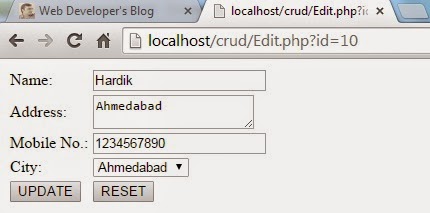
Update Record: Create file name Edit.php put the below content for update existing record in the table.

<?php  
include("Config.php"); 
$id = $_GET['id'];
$result = mysql_query("SELECT * FROM user WHERE id = $id") or die(mysql_error());
$row = mysql_fetch_array($result);
if($row)
{ ?>
    <form method="post">
    <input type="hidden" name="txtId" value="<?php echo $row[0]; ?>" />
    <table align="center">
    <tr>
        <td>Name:</td>
        <td><input type="text" name="txtName" value="<?php echo $row[1]; ?>" /></td>    
    </tr>
    <tr>
        <td>Address:</td>
        <td><textarea name="txtAddress" ><?php echo $row[2]; ?></textarea></td>    
    </tr>
    <tr>
        <td>Mobile No.:</td>
        <td><input type="text" name="txtMobileNo" value="<?php echo $row[3]; ?>" /></td>    
    </tr>
    <tr>
        <td>City:</td>
        <td><select name="city">
            <option value="">Select </option>
            <option value="ahmedabad" <?php if($row[4] == 'ahmedabad'){ ?> selected="selected" <?php } ?> >Ahmedabad</option>
            <option value="jamnagar"  <?php if($row[4] == 'jamnagar'){ ?> selected="selected" <?php } ?> >Jamnagar</option>
        </select></td>    
    </tr>
    <tr>
        <td><input type="submit" name="submit" value="UPDATE" /></td>
        <td><input type="reset" name="reset" value="RESET" /></td>    
    </tr>
    </table>
    </form>           <?php
}             
if(isset($_POST["submit"]))
{
                $id = $_POST["txtId"];                  
                $name = $_POST["txtName"];
                $address = $_POST["txtAddress"];
                $mobileNo = $_POST["txtMobileNo"];
                $city = $_POST["city"];
                echo $query = "update user set name = '$name', address = '$address', mobileno = '$mobileNo', city = '$city' where id = '$id'";
                $result = mysql_query($query)or die(mysql_query());
                if($result)
                {
                                header("Location:View.php");                                  
                }
}
?>


swaping two numeric value

Here listed five method of swaping two numeric(integer) value.

method 1: Assign the value of the second variable to the first variable. Third temporary variable $temp is used to hold the value of the first variable so it’s value can't be lost.


$x = 1;
$y = 2;
$temp = '';
$temp = $x;
$x = $y;
$y = $temp;
echo 'Value of X: '.$x;
echo 'Value of Y: '.$y;


method 2: Using php function array and list.


$x = 3;
$y = 4;
list($x, $y) = array($y, $x);
echo 'Value of X: '.$x;
echo 'Value of Y: '.$y;


method 3: Using addition and subtraction


$x = 5;
$y = 6;

$x = $x + $y;
$y = $x - $y;
$x = $x - $y;

echo 'Value of X: '.$x;
echo 'Value of Y: '.$y;


method 4: Using Division  and multiplication


$x = 7;
$y = 8;

$x = $x * $y;
$y = $x / $y;
$x = $x / $y;

echo 'Value of X: '.$x;
echo 'Value of Y: '.$y;


method 5:  using XOR method


$x = 9;
$y = 10;

$x = $x ^ $y;
$y = $x ^ $y;
$x = $x ^ $y;

echo 'Value of X: '.$x;
echo 'Value of Y: '.$y;


Disadvantage of this method is difficult to understand the process.