Find the below code for developing CRUD(create, retrive, update, delete) application
in php .
here is added the code for creating crud applcation . i used user table for this operations.
Code for creating table in database
CREATE TABLE IF NOT EXISTS `user` (
`id` int(11) NOT
NULL AUTO_INCREMENT,
`name` varchar(20)
NOT NULL,
`address`
varchar(20) NOT NULL,
`mobileno`
varchar(20) NOT NULL,
`city` varchar(20)
NOT NULL,
PRIMARY KEY (`id`)
) ENGINE=InnoDB
DEFAULT CHARSET=latin1 AUTO_INCREMENT=10 ;
Create Config.php file for connecting database
<?php $cn = mysql_connect("localhost","root","");
mysql_select_db("practice",$cn); ?>
replace your database name in place of practice. Add your host name, username password for the database connection.
Adding Record: Create file Add.php put the below content for adding record
in the table.
<form method="post">
<table align="center">
<tr>
<td>Name:</td>
<td><input
type="text" name="txtName" /></td>
</tr>
<tr>
<td>Address:</td>
<td><textarea
name="txtAddress"></textarea></td>
</tr>
<tr>
<td>Mobile No.:</td>
<td><input
type="text" name="txtMobileNo" /></td>
</tr>
<tr>
<td>City:</td>
<td><select
name="city">
<option value="">Select
</option>
<option
value="ahmedabad">Ahmedabad</option>
<option
value="jamnagar">Jamnagar</option>
</select></td>
</tr>
<tr>
<td><input
type="submit" name="submit" value="INSERT"
/></td>
<td><input
type="reset" name="reset" value="RESET"
/></td>
</tr>
</table>
</form>
<?php
include("Config.php");
if(isset($_POST["submit"]))
{
$name
= $_POST["txtName"];
$address
= $_POST["txtAddress"];
$mobileNo
= $_POST["txtMobileNo"];
$city
= $_POST["city"];
echo
$query = "insert into user(name, address, mobileno, city)
values('$name','$address','$mobileNo','$city')";
$result
= mysql_query($query)or die(mysql_query());
if($result)
{
header("Location:View.php");
}
}
?>
See below image about insert record

Display all record : Create file name View.php and add below content for listing records from the table.
<?php
include("Config.php");
if(isset($_GET["action"]))
{
$id = $_GET['id'];
if($_GET["action"] == "delete")
{
$result = mysql_query("delete from user where id = $id")or die(mysql_error());
header("Location:View.php");
}
else if($_GET["action"] == "edit")
{
header("Location:Edit.php?id=$id");
}
else
{
header("Location:View.php");
}
}
?><html>
<head>
<title>CRUD Operation Example</title>
</head>
<body>
<a href="Add.php">Add Record</a>
<table border="1">
<thead>
<th>Name</th>
<th>Address</th>
<th>Mobile No.</th>
<th>City</th>
<th colspan="2">Action</th>
</thead>
<tbody>
<?php
$query = "select * from user";
$result = mysql_query($query);
while($row = mysql_fetch_row($result)or die(mysql_error()))
{
echo "<tr>";
echo "<td>".$row[1]."</td>";
echo "<td>".$row[2]."</td>";
echo "<td>".$row[3]."</td>";
echo "<td>".$row[4]."</td>";
$id = $row[0];
echo "<td><a href='?action=edit&id=$id'>EDIT</a></td>";
echo "<td><a href='?action=delete&id=$id'>DELETE</a></td>";
echo "</tr>";
}
?>
</tbody>
</table>
</body>
</html>

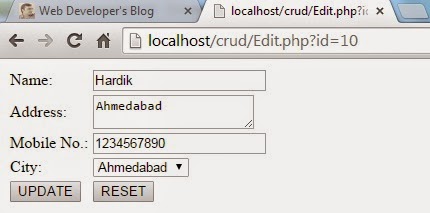
Update Record: Create file name Edit.php put the below content for update existing record in the table.
<?php
include("Config.php");
$id = $_GET['id'];
$result = mysql_query("SELECT * FROM user WHERE id =
$id") or die(mysql_error());
$row = mysql_fetch_array($result);
if($row)
{ ?>
<form
method="post">
<input
type="hidden" name="txtId" value="<?php echo
$row[0]; ?>" />
<table
align="center">
<tr>
<td>Name:</td>
<td><input type="text" name="txtName"
value="<?php echo $row[1]; ?>" /></td>
</tr>
<tr>
<td>Address:</td>
<td><textarea name="txtAddress" ><?php echo
$row[2]; ?></textarea></td>
</tr>
<tr>
<td>Mobile No.:</td>
<td><input type="text" name="txtMobileNo"
value="<?php echo $row[3]; ?>" /></td>
</tr>
<tr>
<td>City:</td>
<td><select name="city">
<option
value="">Select </option>
<option
value="ahmedabad" <?php if($row[4] == 'ahmedabad'){ ?>
selected="selected" <?php } ?> >Ahmedabad</option>
<option
value="jamnagar" <?php
if($row[4] == 'jamnagar'){ ?> selected="selected" <?php } ?>
>Jamnagar</option>
</select></td>
</tr>
<tr>
<td><input type="submit" name="submit"
value="UPDATE" /></td>
<td><input type="reset" name="reset"
value="RESET" /></td>
</tr>
</table>
</form> <?php
}
if(isset($_POST["submit"]))
{
$id =
$_POST["txtId"];
$name =
$_POST["txtName"];
$address
= $_POST["txtAddress"];
$mobileNo
= $_POST["txtMobileNo"];
$city =
$_POST["city"];
echo
$query = "update user set name = '$name', address = '$address', mobileno =
'$mobileNo', city = '$city' where id = '$id'";
$result
= mysql_query($query)or die(mysql_query());
if($result)
{
header("Location:View.php");
}
}
?>